In most greenfield implementations, when the FP&A and Accounting teams start using EPM tools, one of the most difficult thing to adapt is moving them over from tradition excel interface to submit and analyze the data using Data forms. I am pretty sure this was the feedback which Oracle received from its customers, and to make things simple, Flex Forms were introduced in 2021 and which basically combines the powerful Smart View Ad hoc with traditional Forms retaining all the properties and features.
Flex forms, as the name suggests provides flexible row and column management in Smart View allowing the end users, who obviously love excel to play around with their existing links and to come up with the most efficient ways to create their Budgeting and Forecasting submission processes.
Supported Modules : Planning, Financial Consolidation and Close, Tax Reporting.
I wanted to highlight a recent implementation where the functionality of Flex Forms was very useful.
Use Case:
The requirement was to have dynamic forms which the end users can use to copy members in the rows from their existing ad hoc sheets to submit data. Now, there is risk of giving them ad hoc submit access, as they can have data in random buckets and the risk of relevant business rules and data pushes not running plus would lead to unwanted data in the database.
Solution:
No points for guessing, Flex forms was the answer. Not only you can change your existing traditional form to Flex Form with a check mark, but you can also restrict the POV so that the data goes to the right bucket, giving the flexibility to add only rows/columns i.e. accounts, entities etc.
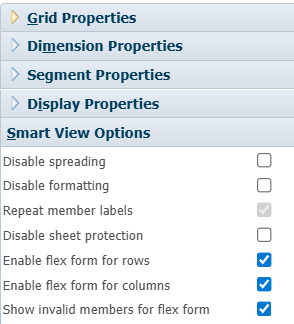
As long as the user has access to that dimension in rows, they can copy paste from another adhoc sheet or type in the exact name and go ahead with submitting their data.
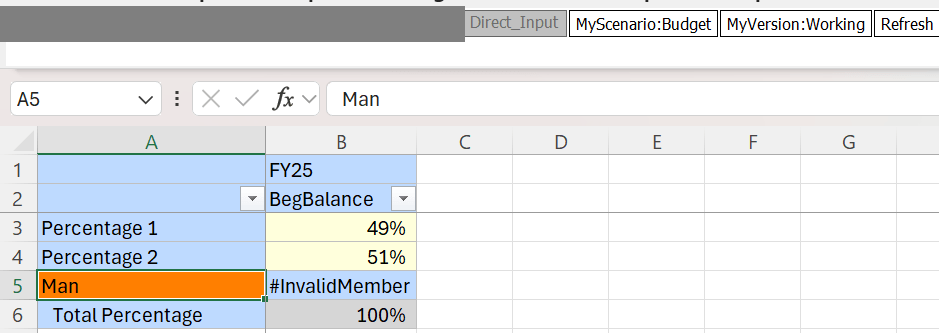
If an invalid member is copy pasted, it gives a invalid member message as long as you have enabled flex on rows and columns, making it very user friendly and maintaining the data integrity. You can then attach all the as usual business rules, smart pushes etc. It also allows users to add new members with suppress missing on, which is very useful feature which allows users to submit specific data without scrolling down all dimensions.
Limitations:
As every feature, Flex Forms come with its own limitations, which I am pretty sure Oracle would fix in the future releases. Below are some which I noticed.
Validation Rules in Forms are not supported in Flex forms, you will have to write a Groovy to achieve the conditional based coloring.
Flex Forms functionality cannot be achieved in Web, it has to be done in Smart View which is pretty ok, as I believe its the intended functionality.
Below are some useful links from Oracle which you can go through to know more about this topic and as always, let me know what you think about Flex Forms and hope if you are reading this, it was helpful.
General Guidelines : https://docs.oracle.com/en/cloud/saas/enterprise-performance-management-common/svpbc/flex_forms_guidelines_general.html
Working with Flex Forms in Smart View: https://docs.oracle.com/en/cloud/saas/enterprise-performance-management-common/svurc/flex_forms_working_108x5aac7b6c.html
 Elevate EPM
Leave a comment